Change media ownership to someone else
- Log in to Kaltura MediaSpace.
- Navigate to the My Media page.
- From the media's menu, select Edit.

- Select the Collaboration tab.
- Select Change media owner.
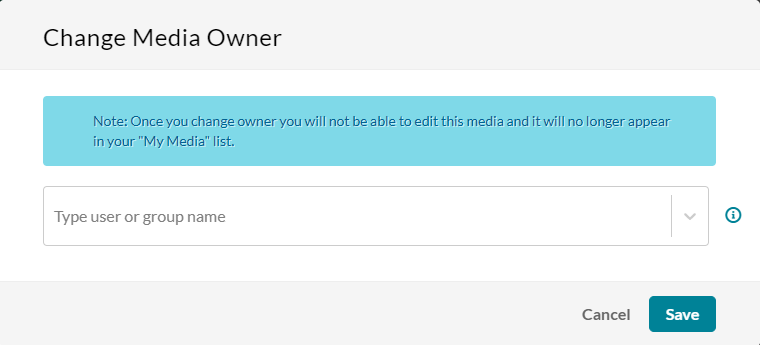
- In the Change Media Owner window, enter the email address or StarID for the new owner. The new owner must be an existing MediaSpace user.
- Select Save to transfer the media to the new owner.
Transferring ownership of media owned by someone else
Employees who are off-boarding should proactively transfer ownership of their MediaSpace files before their last day of work. If the owner of the media has already ended employment, requests to have files transferred must be approved by your college or university's Chief Human Resources Officer (CHRO). For employees in the system office, requests can be approved by the supervisor of your business unit.
Please submit a service request to request media ownership transfer for Kaltura MediaSpace videos where the original owner is no longer available. Please include:
- Written approval from your CHRO or appropriate manager.
- The StarID and/or email address of the original owner.
- The StarID and/or email address of the new owner.
- A detailed description of the media you need transferred. (Links, file names, etc.)
Add collaborators to media
- Log in to Kaltura MediaSpace.
- Navigate to the My Media page.
- From the media's menu, select Edit.
- Select the Collaboration tab.
- Select +Add Collaborator.
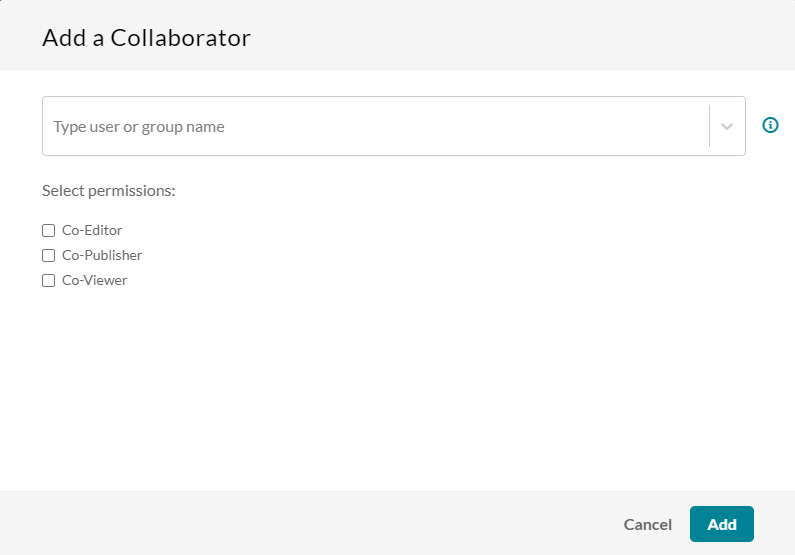
- In the Add a Collaborator window, enter the email address or StarID for the new owner. The new owner must be an existing MediaSpace user.
- Choose the type(s) of permissions for the collaborator you are adding to the media entry. The types of collaborators and their permissions are as follows:
- Co-Editor - Can edit this media's details and metadata, trim media, replace media, edit captions, edit chapters, and edit slides. Co-editors can't delete media or add new co-editors and co-publishers. Co-editors can see the analytics page for the media they co-edit.
- Co-Publisher - Can publish this media to their entitled Categories or Channels.
- Co-Viewer - Can only view this media and doesn't have editing or publishing permissions.
- Select Add.
For additional details and options, refer to Kaltura's documentation about change media ownership & add collaborators.